

TextWing guide · every feature
Everything TextWing does. Beyond the looks.
TextWing turns speech into animated captions inside Premiere Pro. The looks get the attention, but the same panel also cuts silence, pulls the voice out of music, writes titles, checks app safe zones and lets you fix every word. Each feature below is shown on the real panel.
Real screenshots of TextWing 4.1. People in the videos are AI illustrations.
What is inside
One panel, ten jobs.
- Start
Set In and Out around your clip, then Generate captions. Cut silence and Isolate voice sit just above.
- Style
Pick a look: One look, Mix or My preset. Edit look holds colours, fonts, effects and motion.
- Words
Read and fix the captions. Choose how many words show. Tap a word to make it big.
- Timeline
Add to timeline places native text layers above your video. Rebuild follows your later edits.
Three modes
One look. Mix. My preset.
The switch at the top of the Style page decides how your captions are dressed. It is the first thing to choose.
Every caption the same
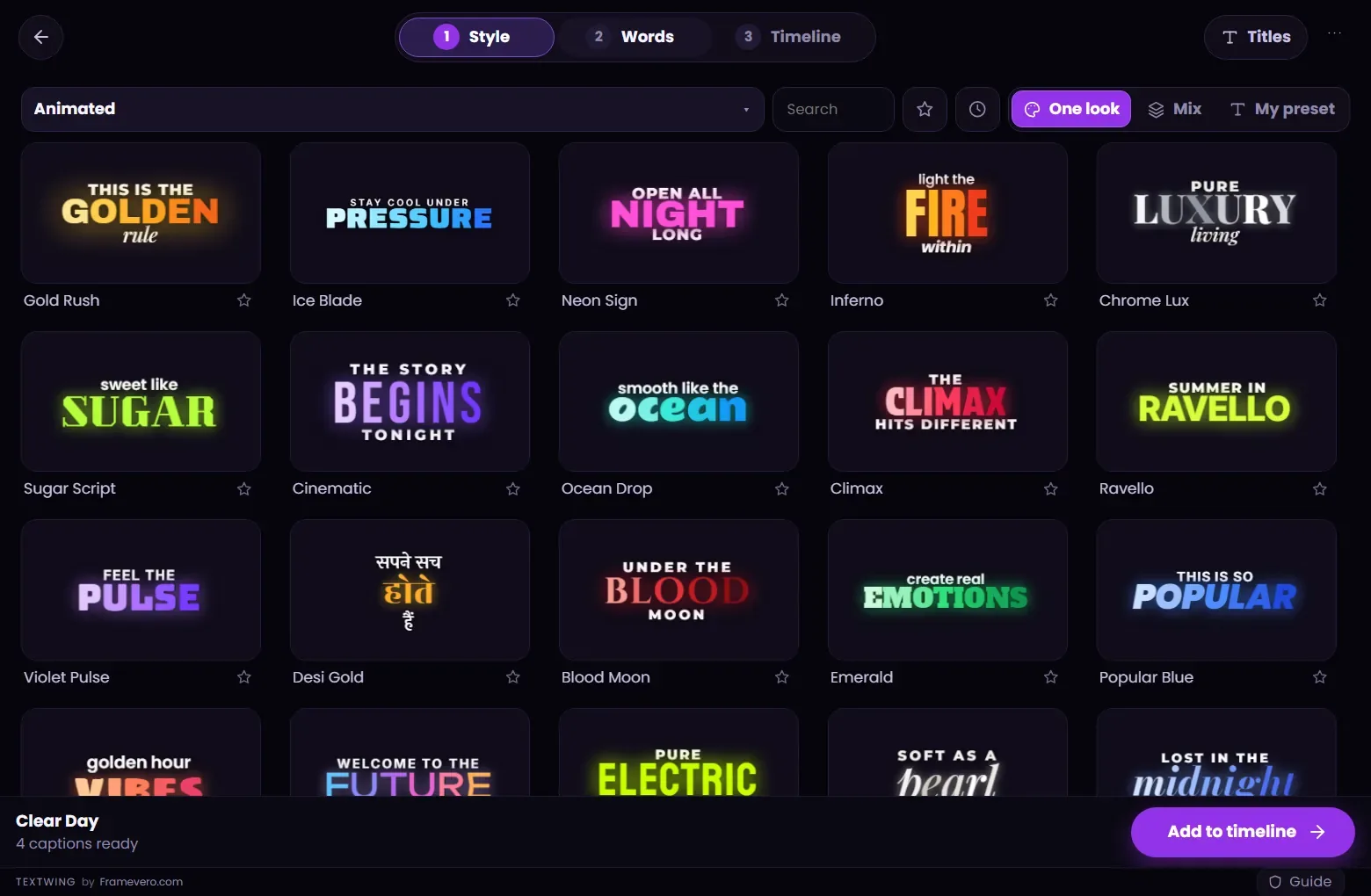
Pick one of the 300+ looks. The whole video gets its font, colours, effects and motion.
Up to ten looks take turns
Pick several looks and set how long each one stays. Good for long videos and talking-head content that needs variety.
Your own Premiere designMOGRT: next update
Style one text layer in Premiere the way your brand needs it and press +. Every caption follows it. Next: select any MOGRT on your timeline and every caption uses it, its animations included.


300+ looks
Handmade looks, moving on the cards.
Every card plays its own animation, so you see the motion before you choose. Shelves include Animated, Creator Picks, Emoji and the Classic set, with looks made for Hindi as well as English.
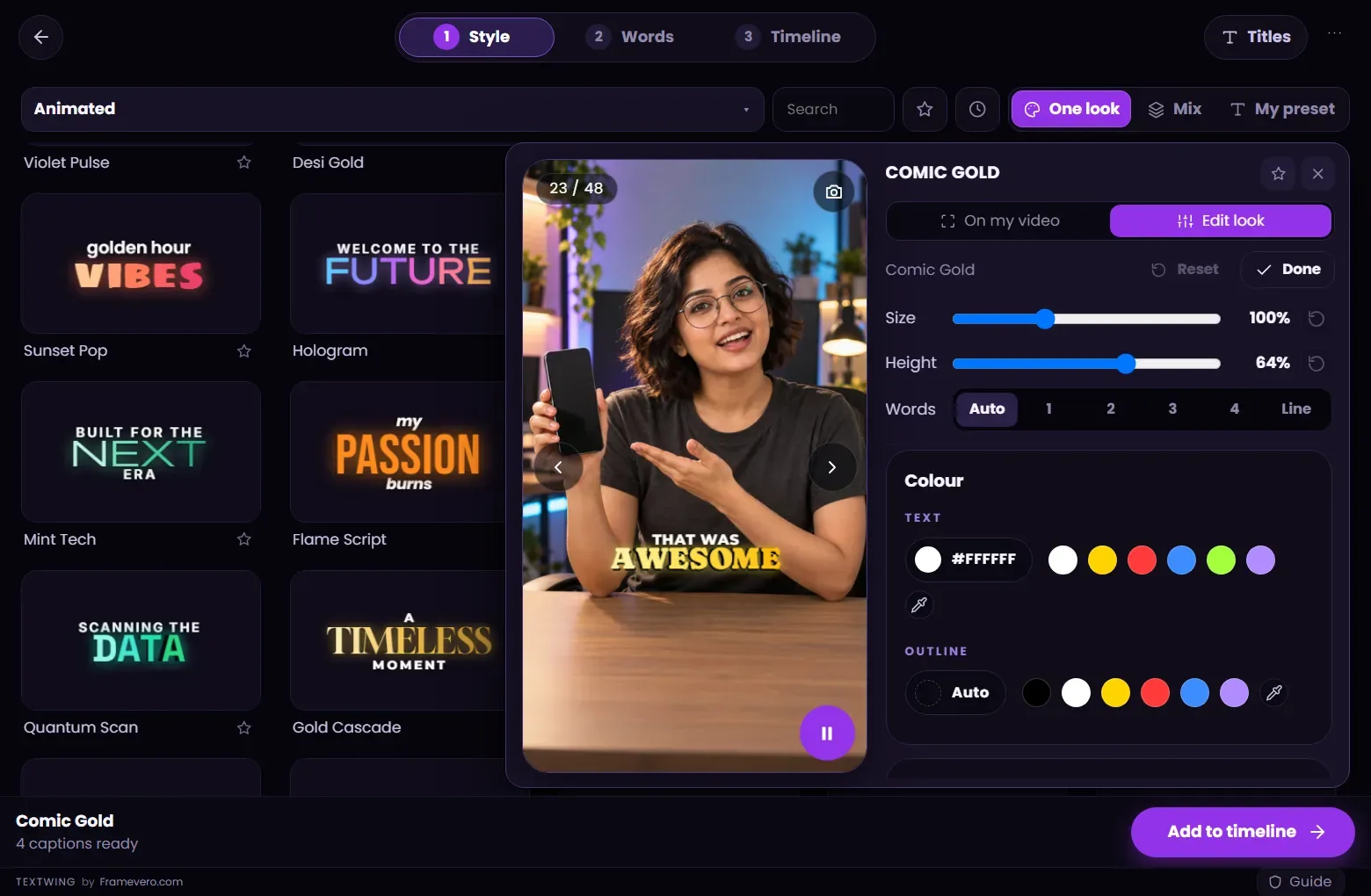
- Click a card: the Peek shows it on a frame of your own video.
- Size Small, Medium or Large; height Low, Mid or High.
- Edit look: colours, fonts, glow, shadow and motion.
- A size slider under the grid: 5 big cards or 20 small ones.
Words
The whole game is in the words.
Captions are only as good as their words. The Words page lets you read every caption against its time and fix it fast.
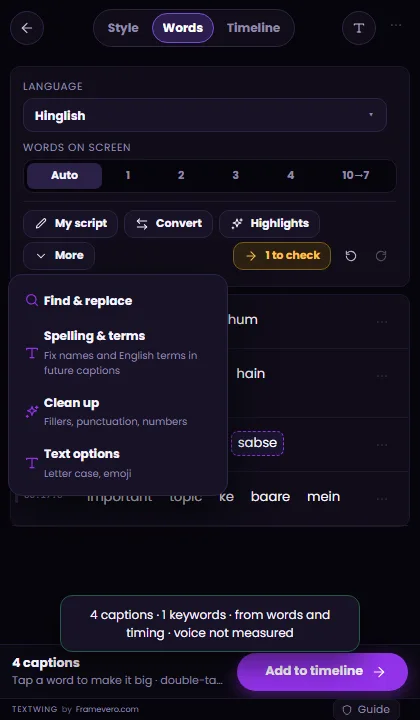
- Words on screen: Auto, or exactly 1, 2, 3 or 4 words per caption, up to a full line.
- Tap a word to make it big. Double-tap a line to edit it; the timing stays.
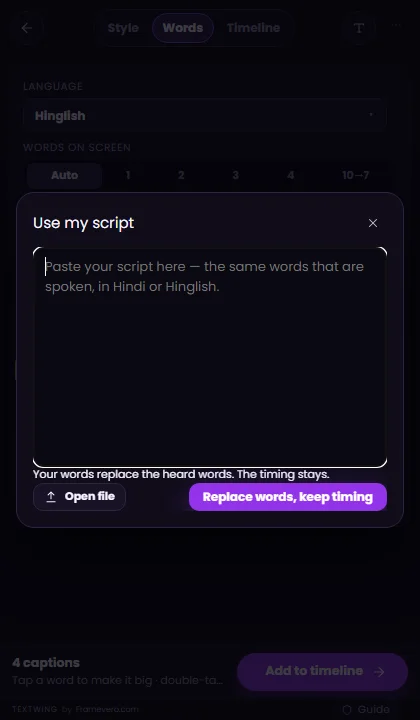
- My script: paste your script and your words replace what was heard, keeping the timing.
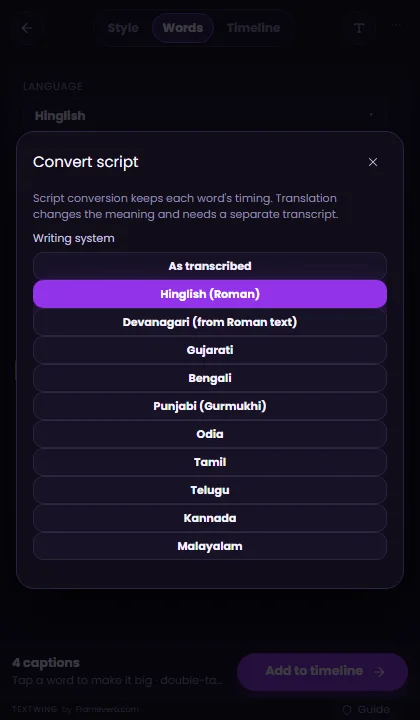
- Convert: Hinglish to Devanagari, Gujarati, Bengali, Punjabi, Odia, Tamil, Telugu, Kannada or Malayalam script.
- More: Find & replace, Spelling & terms (fixed in every future video), Clean up fillers and punctuation, letter case and emoji.

Languages
Hindi, Hinglish and 90+ languages.
Spoken is detected for you. Write in decides the script: Hinglish in Roman letters, हिंदी, or English translated from the speech. English words stay English inside Hinglish captions.
- Hindi, Hinglish and 22 Indian languages.
- English and 90+ world languages.
- English captions from Hindi and other Indian speech.
- Not out yet: writing captions into other languages, such as Spanish. We will say so when it is.

Cut silence
Pauses out before you caption.
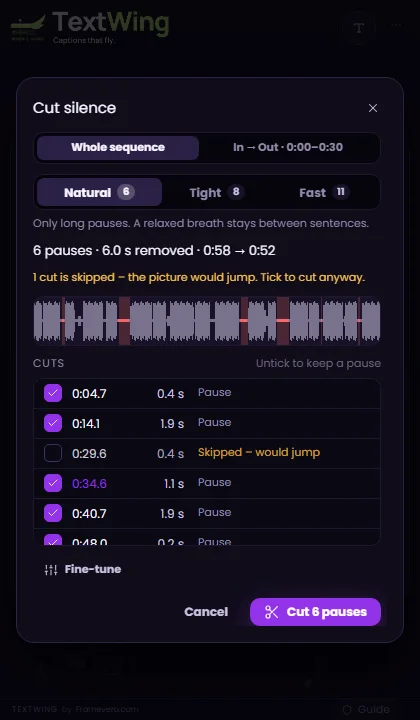
Cut silence listens to the sequence, lists every long pause and cuts them on the timeline, so the edit starts tight and the captions follow the new cut.
- Natural, Tight or Fast: how much breath stays between sentences.
- Whole sequence, or only between In and Out.
- Every cut is listed; untick any one to keep that pause.
- Cuts that would make the picture jump are skipped.
- A backup of the sequence and Undo last cut.
Isolate voice
Music behind the voice? Pull it apart.
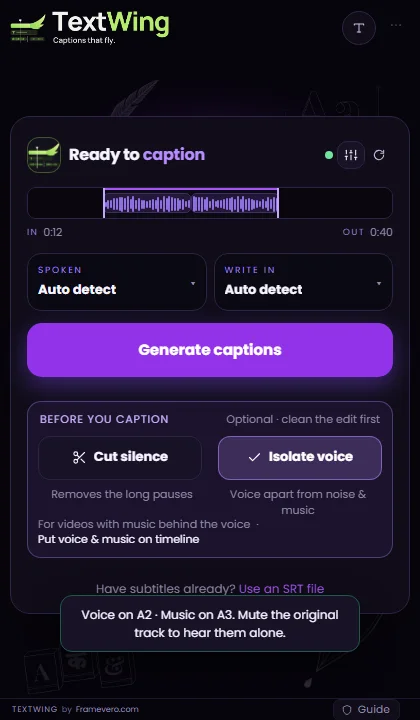
Turn on Isolate voice and TextWing separates the voice from the music before it listens, so words under a music bed are heard and written right.
- Put voice & music on timeline: two clean stems on free audio tracks.
- Your original audio is not touched. Mute it to hear the stems alone.
- Runs on your PC. The voice model downloads once on first use (64 MB).
Titles
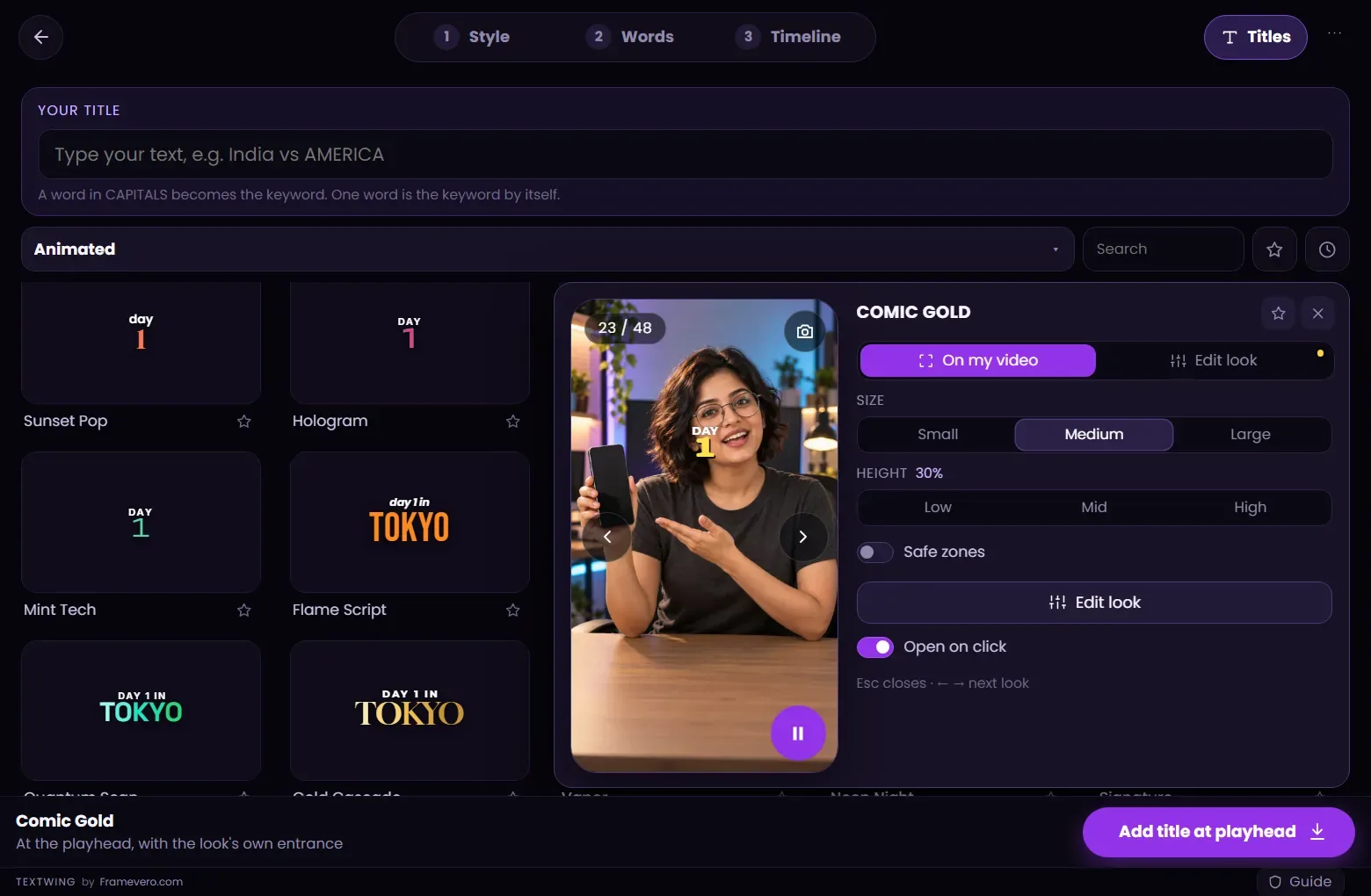
Any text, any look, at the playhead.
Titles sits at the top right of the panel. Type a line, pick a look and add it where the playhead is. A word in CAPITALS becomes the keyword, the same way it does in captions.
- Every card shows your own text while you type.
- Hooks, chapter titles, names, prices: no transcript needed.
Guide · safe zones
Clear of the app buttons.
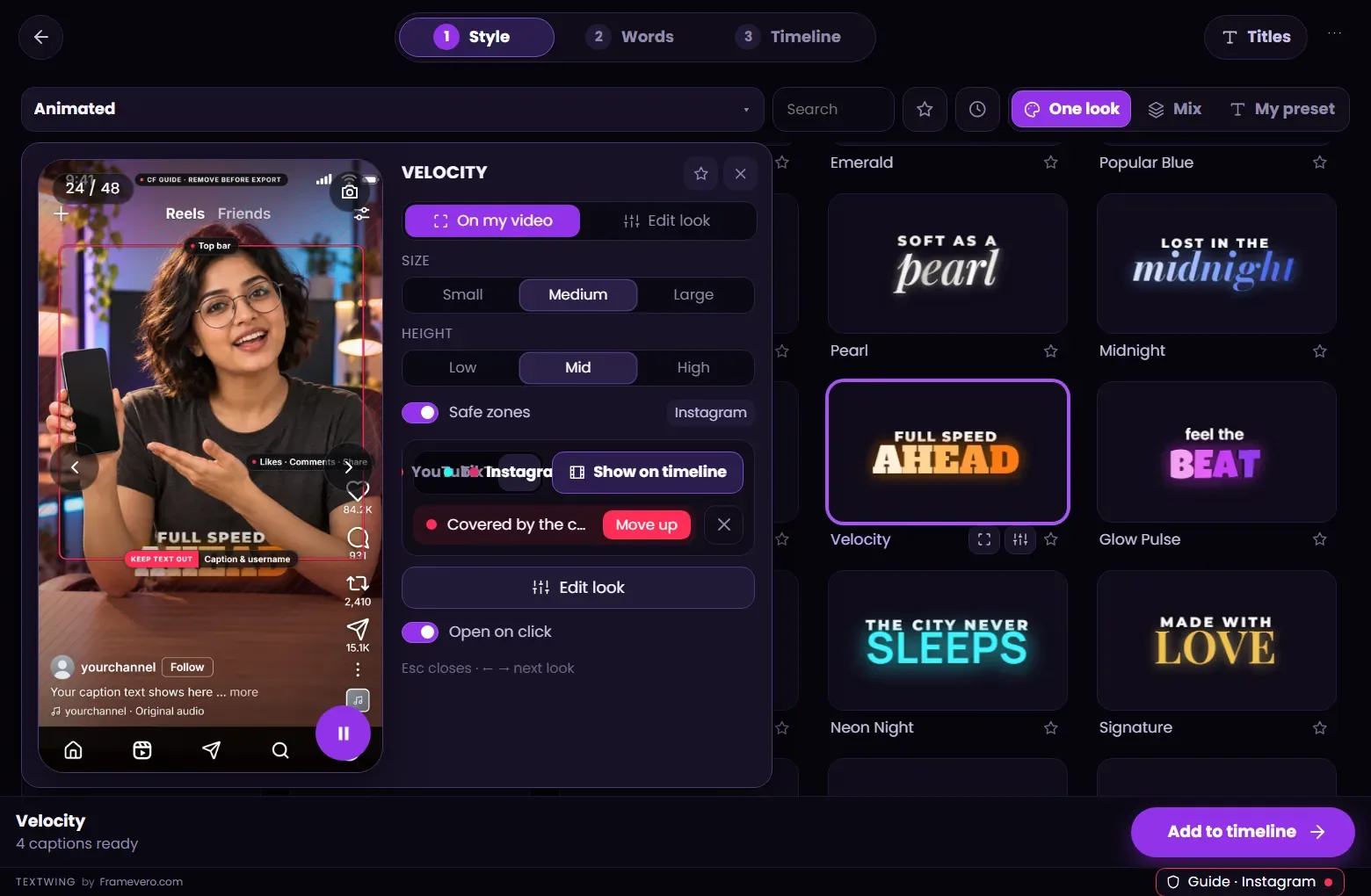
Reels, TikTok and YouTube Shorts cover parts of the frame with names, buttons and caption text. The Guide shows those areas over your preview and checks the look against them.
- Instagram, TikTok, YouTube Shorts and Facebook areas, from each platform's own safe-zone specs.
- “Covered by the caption area”? Press Move up.
- Show on timeline puts the guide on a top track while you edit. Remove it before export.
Timeline
Native text layers, right where they belong.
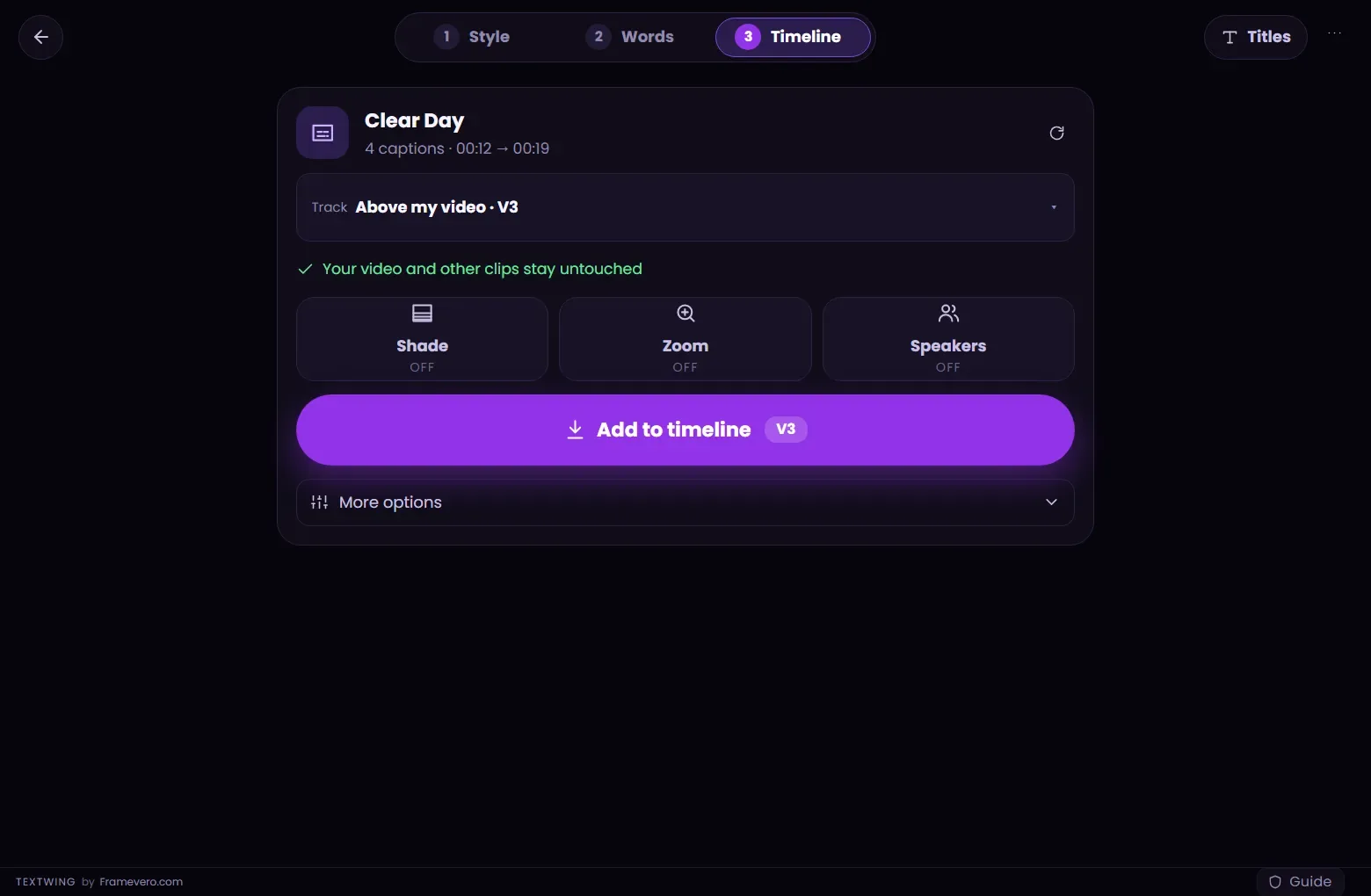
Add to timeline places real Premiere Pro text layers on a free track above your video. Your video and other clips stay untouched.
- Shade: a soft dark gradient behind the captions, never over faces.
- Zoom: a punch-in on stressed words, as a jump cut or smooth.
- Speakers: each voice gets its own colour.
- Rebuild: after you change the cut, the captions follow it.
Offline
Your footage stays on your PC.
Speech recognition runs on your own computer. Nothing is uploaded and there are no credits to buy: caption as many videos as you like.
- First start downloads the speech models once: about 0.8 GB, or about 5 GB with Hindi and Indian languages.
- An NVIDIA card makes it faster (a 0.4 GB add-on, downloaded only if you have one).
- The licence checks in now and then; a paid key keeps working offline between checks. The trial needs internet.

Free trial
Try every feature on your own video.
Questions
What are One look, Mix and My preset?
Three ways to style captions. One look gives every caption the same look. Mix lets up to ten looks take turns through the video. My preset uses your own design made in Premiere Pro, so the captions follow your brand.
Does TextWing use MOGRTs?
No. Captions land on your timeline as native Premiere Pro text layers, so you can change a word, a font or a colour the normal way. Using a MOGRT that is already on your timeline as My preset is planned for the next update.
Does it work without internet?
Yes. Speech recognition runs on your own computer and your footage is never uploaded. The first start downloads the speech models once (about 0.8 GB, or about 5 GB with Hindi and Indian languages). The free trial needs internet.
Which languages can it caption?
Hindi, Hinglish and 22 Indian languages, and English plus 90+ world languages. Hindi speech can be written as Hinglish (Roman letters), in हिंदी, or translated to English. Writing captions into other languages, such as Spanish, is not out yet.
Can Cut silence ruin my edit?
It shows every pause it wants to cut first, so you can untick any of them. It skips cuts that would make the picture jump, keeps a backup of the sequence and has Undo last cut.
Is there a free trial?
Yes: 3 minutes of captions over 7 days, with 8 looks you can put on your timeline and every look to preview. No card, no watermark.
Windows or Mac?
Windows today. The Mac version is in progress; leave your email on the download page and we will tell you when it is out.
Step-by-step guides
Free trial · Windows
All of it, in one panel. Try it free.
Captions, looks, words, silence, voice, titles and safe zones, inside Premiere Pro.
3 minutes of captions · 7 days · 9 looks on your timeline · no card