YOUTUBE
MEDIA DISCOVERY, BUILT INTO PREMIERE PRO
Source your B-roll.
Without leaving Premiere Pro.
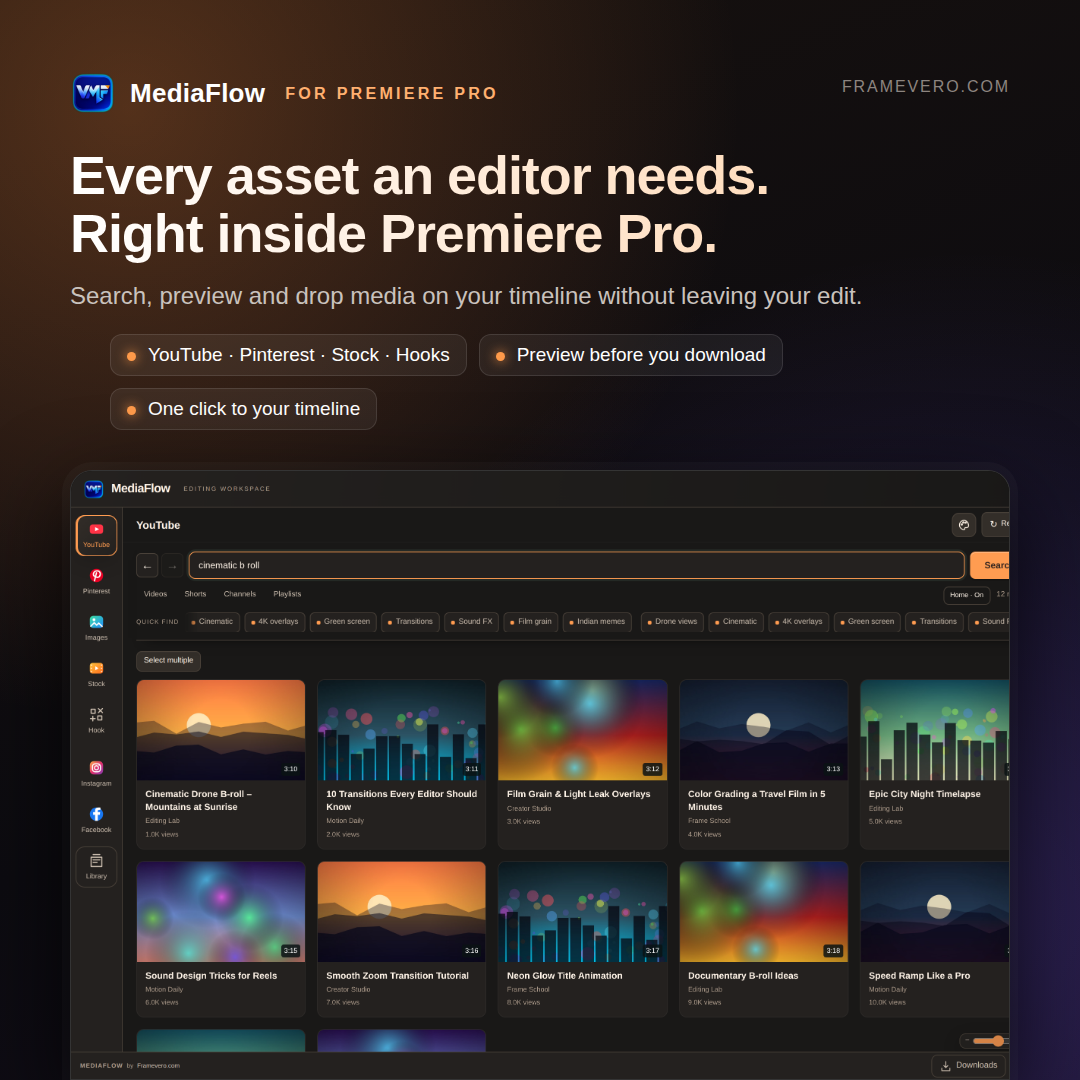
More than a downloader: search, preview, choose and import media from YouTube, Pinterest, Instagram, Facebook and the web directly inside Premiere Pro.
Video, audio, clip ranges and images move from discovery to your project in one flow.
DESIGNED BY A VIDEO EDITOR
Hours of sourcing.
Cut down to seconds.
Keep the idea moving while you search YouTube, Pinterest and the web, preview the result, choose video, MP3, a clip range or an image, and bring it into the active Premiere Pro project.
VARUN MEDIAFLOWLIVENOT DETOURS.
THE WORKFLOW SHIFT
From scattered browser tabs
to one continuous edit.
THE OLD WAY
- PRLeave Premiere
- WEBOpen browser tabs
- FINDSearch multiple sites
- URLCopy the link
- DLUse another downloader
- FILEFind the file
- BINImport into the project
- CUTPlace it on the timeline
THE MEDIAFLOW WAY
- ⌕SearchFind video, audio, overlays, B-roll, images and references inside the panel.
- ▶PreviewWatch or listen before you download. Keep music playing while you edit.
- PrImportSend the result to your chosen bin or place supported media at the playhead.
FIVE SOURCES · ONE PREMIERE WORKFLOW
Everything editors search for.
One panel away.
Video, licensed music and audio, sound effects, overlays, B-roll, PNGs, emoji and visual references. Preview them before import and prepare them for Premiere.
CHANNEL TOOLS
Videos. Shorts. Playlists. Posts.
Open a playlist and download its videos together. View community text, images and polls; copy text or save original-resolution images.Search pins, boards, photos and videos.
Explore visual references and supported public media inside the panel. No Pinterest password is requested by MediaFlow.INSTAGRAM + FACEBOOK
Paste a supported public link.
Preview a public Reel, post or video and prepare it for your Premiere project.IMAGES
Full-resolution stills that Premiere accepts.
Search backgrounds, textures, overlays, logos, icons and emoji. Images convert automatically and transparency stays transparent.QUEUE + THEMES
Know what is downloading and what is ready.
A dedicated Queue keeps active and completed downloads organized. Choose from three visual themes.PROJECT READY
Chosen bin. Current playhead. No Downloads-folder hunt.
Downloaded media imports into the active Premiere project automatically. A validated licence can remain available for up to 72 hours during a temporary connection loss.BUILT FOR THE EDIT
The detour.
Then the real panel.
The original File Detour film stays large. Three compact real plugin screens sit directly underneath it.
Stop losing the cut to the Downloads folder.
The original File Detour film: browser-to-downloads-folder friction collapsed into one Premiere Pro workflow.
3 REAL PLUGIN SCREENS · YOUTUBE · PINTEREST · IMAGES


REAL PRODUCT · FEWER STEPS · MORE EDITING TIME
See MediaFlow
inside Premiere Pro.
Watch search, in-panel preview and direct Premiere import happen in one flow. It is not another standalone downloader. It keeps the complete sourcing workflow beside your edit.
17 REAL EDITOR REVIEWS · ENGLISH + HINGLISH
Editors stayed in flow.
Then told us why.
“Varun MediaFlow has genuinely made my Premiere Pro workflow faster. Searching and previewing media directly inside Premiere saves a lot of time. I no longer need to keep switching between multiple websites, downloaders and folders. It feels like a tool built around an editor’s real daily workflow.”
Collected from editors using MediaFlow. Names remain private until publish permission is recorded.
- 5 out of 5 from a Video Editor: Varun MediaFlow has genuinely made my Premiere Pro workflow faster. Searching and previewing media directly inside Premiere saves a lot of time. I no longer need to keep switching between multiple websites, downloaders and folders. It feels like a tool built around an editor’s real daily workflow.
- 5 out of 5 from a Senior Video Editor: I’ve been using Varun MediaFlow for a while and the experience has been great. Finding B-roll and other assets is much quicker now. I can search, preview and download without leaving Premiere Pro. It removes a lot of unnecessary steps from the editing process.
- 5 out of 5 from a YouTube Video Editor: MediaFlow use karne ke baad workflow kaafi smooth ho gaya hai. Pehle browser, downloader aur Premiere ke beech baar-baar switch karna padta tha. Ab search aur preview ka kaam Premiere ke andar hi ho jata hai. Daily editing mein genuinely kaafi time save hota hai.
- 4.5 out of 5 from a Video Editor: Varun MediaFlow is much more useful than a normal downloader. The integrated search and preview workflow makes a noticeable difference while editing. It reduces interruptions and keeps the process more organized. A very practical extension for regular Premiere Pro users.
- 5 out of 5 from a Freelance Video Editor: I work on multiple projects every week and this extension saves a surprising amount of time. Searching for the right media has become much easier. Everything stays close to the Premiere Pro timeline. It is a practical tool for editors working on tight deadlines.
- 5 out of 5 from a Content Editor: MediaFlow has made asset searching much less frustrating for me. I don’t need to open different websites every time I need a clip or reference. Search, preview and download feel like part of the Premiere workflow now. It helps me stay focused on the actual edit.
- 5 out of 5 from a Motion Graphics Editor: Varun MediaFlow ka concept simple hai but kaafi useful hai. Asset dhundhne ke liye editing flow break nahi hota aur browser tabs bhi kam open karne padte hain. Premiere ke andar hi search aur preview mil jana bahut convenient hai. Mere workflow mein definitely speed improve hui hai.
- 5 out of 5 from a Video Editor & Creator: One of the best things about MediaFlow is that it keeps you focused on the edit. Normally asset hunting can completely break the creative flow. Here I can search and preview media without constantly leaving Premiere Pro. It genuinely helps reduce wasted time.
- 4.5 out of 5 from a Social Media Editor: For reels and short-form content, speed matters a lot. Varun MediaFlow helps me find supporting footage faster than my old workflow. There is less browser switching and less file management. It has been very helpful for day-to-day editing work.
- 5 out of 5 from a Professional Video Editor: Pehle mujhe laga tha ye sirf ek downloader type extension hoga, but MediaFlow usse kaafi zyada useful nikla. Search, preview aur download ka workflow Premiere ke andar milna main advantage hai. Chhote-chhote repetitive steps kam ho jate hain. Regular editors ke liye kaafi practical tool hai.
- 5 out of 5 from a Post Production Editor: Varun MediaFlow fits naturally into Premiere Pro. I can quickly look for media and preview it while staying inside my editing environment. That means fewer distractions and faster project completion. It has become a useful addition to my editing setup.
- 5 out of 5 from a YouTube Editor: Finding the right B-roll used to take a significant part of my editing time. MediaFlow has made that process noticeably quicker. Being able to handle most of it directly from Premiere Pro is the biggest advantage. Very useful for YouTube and content editors.
- 4.5 out of 5 from a Creative Video Editor: I’ve tested Varun MediaFlow on different types of projects and the workflow feels clean and straightforward. Searching and previewing assets is quick, and it removes several small but annoying steps. It is a solid productivity extension with a lot of practical value.
- 5 out of 5 from a Multimedia Editor: Mere liye sabse bada benefit convenience hai. Pehle screen par browser tabs, downloader aur folders sab ek saath khule rehte the. MediaFlow se asset search ka major part Premiere ke andar hi manage ho jata hai. Workflow ab zyada organized aur fast lagta hai.
- 5 out of 5 from a Freelance Editor: As a freelancer, anything that saves editing time is valuable. Varun MediaFlow makes finding online media faster and easier. I spend less time managing downloads and more time actually editing. It is especially useful when multiple projects are running together.
- 4.5 out of 5 from a Video Producer: Using Varun MediaFlow has made my asset collection process smoother. I especially like being able to preview content before deciding what I need. It keeps the workflow cleaner and reduces unnecessary back-and-forth. A smart tool designed around real editor problems.
- 5 out of 5 from a Senior Video Editor: MediaFlow daily editing ke liye genuinely helpful laga. Required media search karna aur preview karna pehle se kaafi fast ho gaya hai. Sabse achhi baat ye hai ki baar-baar Premiere se bahar jane ki zarurat kam padti hai. Productivity improve hoti hai aur workflow continuous rehta hai.
FREE PREMIERE SPEED PACK
Source faster.
Before you buy.
Get the free Premiere Sourcing Speed Pack plus MediaFlow launch updates and price alerts. No daily spam.
FOUNDING EDITOR RELEASE
Less time sourcing.
More time editing.
Less than one month of Premiere Pro. Yours forever.
System requirements
- Windows 10/11 or macOS 10.15+
- Apple Silicon, Intel Mac or Windows x64
- Adobe Premiere Pro 2024 (24.x) or newer
- Internet for activation and downloads
India offer: ₹2,599 ₹999. Every customer receives lifetime product access and updates.
- Windows + macOS packages
- Apple Silicon + Intel Mac support
- One computer activation
- Lifetime licence. No subscription.
- Lifetime updates included
- Automatic licence certificate by email
CLEAR LICENCE TERMS
One editor.
One computer.
One-time payment. No subscription. Lifetime updates are included.
International Gumroad orders receive a branded PDF with the activation code by email. Paste that code into MediaFlow on Windows or macOS.
Email support. The old activation is released before the licence moves to the new computer.
If the connection drops after a successful licence check, the activated panel can keep opening for up to 72 hours. Search and downloads still require internet.
THE DETAILS
Before you hit the timeline.
Is MediaFlow just a downloader?+
No. MediaFlow brings search, in-panel preview, format and clip selection, queue control and automatic Premiere import into one editing workflow across YouTube, Pinterest, Instagram, Facebook and Images.
How does activation work?+
After an international Gumroad purchase, a branded licence certificate containing your one-computer activation code is emailed automatically. Install the Windows or macOS package, open MediaFlow and paste the code. India orders receive the code with direct delivery support.
Where does downloaded media go?+
Choose a Premiere project bin. Supported media can also be placed directly at the current playhead.
Does MediaFlow include a stock-media licence?+
No. MediaFlow is a workflow tool, not a stock library. Use media you own or are otherwise authorized to access and use.
Is this an official Adobe or platform product?+
No. Varun MediaFlow by FRAMEVERO is an independent third-party product and is not affiliated with or endorsed by Adobe, YouTube, Pinterest, Meta or Google.
TIME SAVED IN SOURCING IS TIME RETURNED TO THE CUT